General Wisdom for Artists in 2025

I first started these General Wisdom for Artists posts over ten years ago! Analytics tells me that people have actually been reading them!

Perhaps this is too personal, too abstract, too disparate. I don’t know. I’m writing it to get my thoughts in order as much as to help others. Here we go:

Fluency

There exists a type of learning that can only be built up through repeated doing. Sounds obvious, I know. But the point is that all these blog posts and art tips are only a skeleton upon which the muscle and sinew of actual experience must grow! I call this type of learning “Fluency”.

In the same way you can learn a new language and become fluent- so too can you learn the fundamental principles of art and become fluent in each of them. Think of it this way- you can speak a new language by consulting a phrase book, or you can become fluent in it. It’s the difference between book-learning and true understanding.

You don’t know what you don’t know.

Supposing you recorded your workflow for a few different pieces and put them on youtube. Then you watched it back, maybe comparing your approach to other artists. You’d be struck by the particular patterns you follow and the particular ways you do things. You might also notice a few repeated mistakes.

You have a method, skillset and strengths that you probably haven’t articulated to yourself before. It’s to your benefit to understand these. You don’t know what you don’t know, and tackling your blind spots will make you a better artist.

This connects somewhat with the fluency idea expressed above- because sometimes you can be fluent in doing things wrong! Having looked over some of my recent artwork I know that messing up perspective and tonal values comes to me as easily as riding a bike. I thought I had these things sussed out years ago. It’s something I have to work on I suppose.

Enthusiasm

I haven’t done much digital work for myself in recent years. I used to fill sketchbooks, digital and traditional- and even that has stopped. Life has had ups and downs- and the art “industry” is currently in middle of an existential crisis with generative AI. Or maybe it isn’t- who can say? Personally I don’t know what to think anymore.

It’s a strange time to be a digital artist. We’re sort of still useful, but who knows how long for? I’ve painted book covers for clients who originally used generative AI- but found that the results turned people off by being too artificial- too obviously AI. I occasionally get given AI references that are better than I could ever paint and get asked to recreate it.

I’m rambling a bit but the point is that it’s hard to devote myself to something that used to have such obvious value, and now might not. Should I be re-training as a plumber right now?

The one consistent joy for me has been plein air painting- which might be less about the art and more about the act of getting out into the world and doing something purely for the hell of it. Do what you love, right?
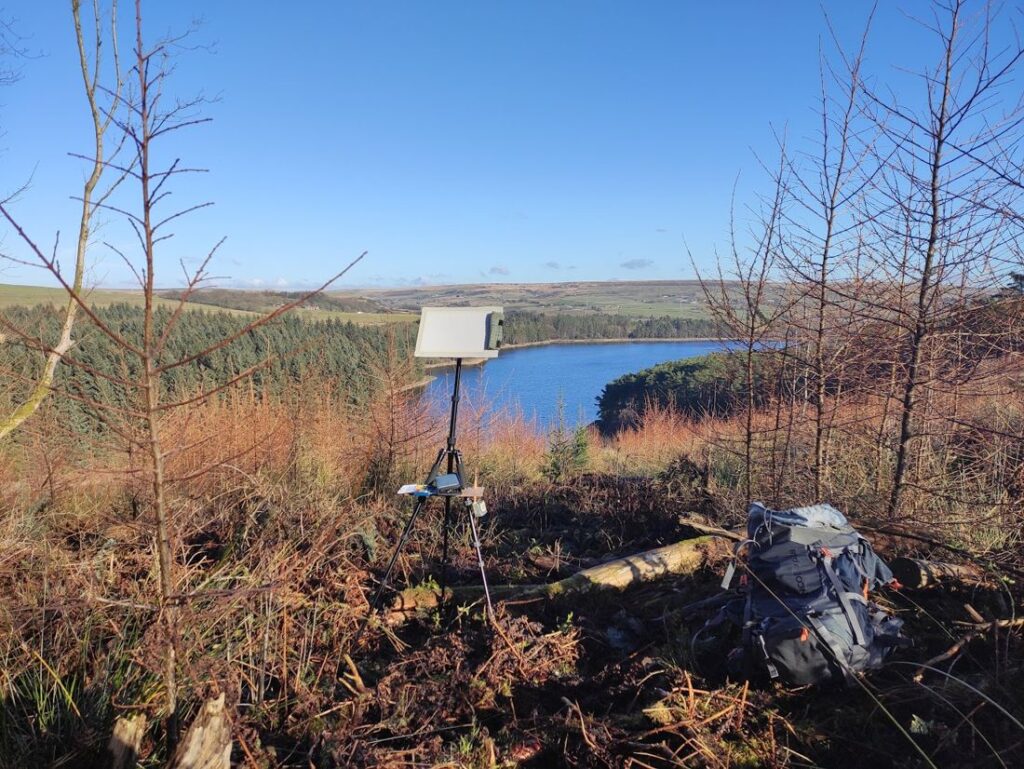
It’s almost always worthwhile to leave the house.

Some final scattered thoughts

Present your work nicely. Consistency is key. I rarely follow my own advice on this one.

Automate unimportant decisions. Life’s to short to spend lots of time on the minor things.

Finish what you start. I’ve been prone to making lots of little incomplete drawings and paintings over the years, and none of them are good enough enough to show to anyone, but also not original or interesting enough to satisfy myself!

Don’t skimp on hardware- I bought an Ipad pro in 2021 and have used it every day since. It was expensive, but it’s been worth it. The lenovo tablet I bought just a couple of years earlier has mainly sat in a drawer because it’s terrible. The price difference wasn’t even that much!

That’s it for another few years I think.

Wacom Art Pen Review

I’d been toying with the idea for some time of getting an art pen for my intuos 5. If you don’t know what an art pen is then you’re probably in the majority, but my intention with this post is to provide a little info for those like me- who a couple of weeks ago who was considering buying one and couldn’t seem to find enough information. For the benefit of those who don’t know what one is: it’s like a normal graphics tablet pen- but as well as sensing the usual pressure and tilt it also senses rotation.

The art pen for intuos 4 & 5
Wacom art pen for intuos 4 & 5 – Like the old grip pen but fatter, and with rotation.

You may notice after a quick google search that this seemingly small feature comes with a pretty weighty price tag (£85 on amazon at the time of writing) and that you’d have to really want that fancy rotation sensing to buy one. Well I really wanted that rotation sensing, and I’ll explain why:

It’s always been my goal with my digital artwork to make it as natural as possible both in how it looks and also how it feels to create. One of the present drawbacks of digital art that we have to overcome is the limited input we have as artists and the limited processing power we can apply to making a computer rendered brush stroke look as nuanced and elegant as real brush stroke. The technology is getting there, but we’re not there yet. It’s true that once you’ve been around a piece of software for a while you start to notice it’s handiwork everywhere you look. Not just layer styles, filters and tacky effects, but even the brush marks you see in other artist’s work. When everyone uses the same tool with the same settings you get some depressingly similar results.

Art pen and the nib holder and nibs it comes with
The nib holder and nibs it comes with

At it’s simplest a digital brush is a series of shapes stamped in a successive line and trying with varying degrees of success to look like something more natural. Thus the desire for rotation sensing- it’s one step further away from the binary on/off state of computer code and one step closer to the intuitive natural feel of a real brush on canvas. Having the rotation sensitivity means you can start to emulate flat brushes and calligraphy pens in a way that isn’t possible without.

So obviously I eventually decided to get one. I’m always filled with trepidation at the idea of forking out lots of money on new kit when I have no idea how useful or reliable it will be, but in the end my curiosity got the better of me. So enough rambling, what’s it like eh? Well, If you’re anything  like me you’ll always want to hear the bad bits first- that’s what anyone who’s considering buying one really wants to know about right?

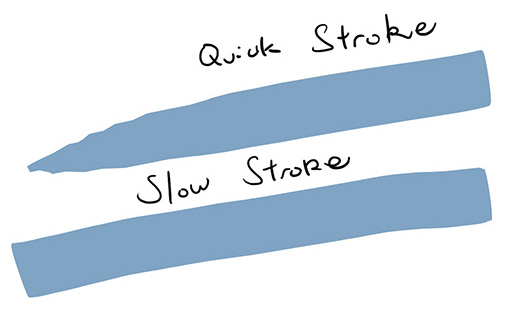
My main issue with the art pen is that it can quickly become quite laggy- not great for realism and natural feeling brush strokes. According to wacom the art pen sends a lot more data to the tablet than the default “grip” pen- which therefore means the delay before the data gets to your computer is greater. We’re talking fractions of a second here, but the effect remains noticeable when you make fast brush strokes. Annoying really. You can see the effect of a fast brush stroke in the image below:

Demonstration of art pen brush strokes
A fast stroke in photoshop vs a slow one. Both are made from right to left. Notice the taper on the top stroke where the rotation angle has changed.

Moving the art pen too quickly means the tablet simply doesn’t seem to have time to process the rotation data before photoshop wants to render its position data and so the brush rotation appears to veer wildly off towards its opposing axis. I made a post in the wacom support forum to see if there was any solution- apparently not- I was advised to paint slower. Hm.

One other lesser thing to be aware of is that the photoshop brush ghosting seems to lag a little. Basically, as you rotate the brush around the brush cursor doesn’t keep up with it very well, but when you’re painting you don’t really notice, since you quickly develop an intuitive feel for where it should be anyway. The only problem the software has with actually rendering the strokes correctly is the aforementioned speed issue.

So what about the good points? Well besides from the above I’ve found it to be quite good. It does what I wanted and it’s a pleasure to use. All but the fastest brush strokes work well. If you’re used to the grip pen it’ll take some getting used to as it’s a bit fatter and heavier, but it soon feels natural.  My art pen now functions as my brush, and my old grip pen with a high friction nib in it works as a pencil or a pen for linework.

So overall, I’d say it’s a worthwhile investment for digital artists looking for that little bit extra control and variation in their brushwork. Be aware that the extra data the tablet sends requires extra processing- so if your computer struggles much with normal strokes you may wish to give this a miss for now. Like I wrote earlier- digital art has a long way to go before it rivals the intuitive and chaotic pleasure of traditional media, but for me this is one step in the right direction.

Update (November 2014): After using the Art Pen for a year or so, I’ve found it to be very useful, but only for drawing with rotation brushes.

The stroke it makes is not as elegant as the grip pen at all- possibly I received a dodgy one, but it never seems to register the lowest levels of pressure. Even pressing at it’s lightest it makes a sudden splodge on the screen, rather than an elegant transition from thin to thick- so it’s really no use at all for delicate strokes. All in all my advice is to stick to the grip pen unless you really really want rotation.

For anyone who does own/decide to get one- I’ve uploaded some rotation brushes for photoshop which you can download for free here: http://spikedmcgrath.com/download/Toms%20Rotation%20Brushes.zip

Prioritising.

One of the key skills of successful freelance illustrator is the ability to prioritise, to be able to use one’s time wisely and effectively. After all, time is money.

Which makes me wonder what the hell I’m doing up at this time in the morning after having spent the last four hours or so creating the three pieces of artwork you see below, which are intended for my little sister to take into school tomorrow and give away to her friends (for free!(apparently eight year-olds don’t have money)). Still, I’ve been getting a little rusty at the traditional painting what with having been using Photoshop for long, and it felt nice to have a break from the computer in favour of drawing inks and foul smelling masking fluid.

I’m rather pleased with how the barn owl turned out actually. 🙂